
How to Create a GST Invoice in India: Format, Mandatory Fields and HSN Codes
A GST invoice does three jobs. It lets you collect tax from your customer, it lets that customer claim input tax credit (ITC), and it feeds the data you report in GSTR-1. Get it wrong and your buyer can lose credit, you can face penalties, and a notice can follow.
This guide explains how to create a GST invoice in India: the correct format, every mandatory field, how many HSN digits you need, worked examples and the mistakes to avoid. You can follow along using the free GeekDas Invoice Generator, which runs in your browser and exports a PDF.
GST rules change through notifications, so confirm anything critical on the official GST portal or with your chartered accountant.
What Is a GST Invoice?
Definition
A GST invoice, formally a tax invoice, is the document a registered supplier issues for taxable goods or services. Rule 46 of the CGST Rules lists what it must contain.
Who Must Issue One
Regular GST-registered businesses issue a tax invoice.
Composition dealers and suppliers of exempt goods or services issue a bill of supply instead, and cannot charge GST.
Unregistered businesses cannot collect GST at all, so they issue an ordinary bill.
GST Invoice Format: Mandatory Fields Under Rule 46
There is no single government template. Any layout works if it carries the required details.
Supplier Details
Name, address and GSTIN of the supplier
Invoice Identifiers
Invoice number: a consecutive serial number, unique for the financial year, up to 16 characters (letters, numbers, hyphen and slash are allowed)
Date of issue
Recipient Details
Name, address and GSTIN of the buyer (the GSTIN is mandatory for registered buyers, and not required on B2C invoices)
Shipping address, if different from the billing address
Item-Level Details
Description of goods or services
HSN code (goods) or SAC (services)
Quantity and unit of measure (for goods)
Discount, if any
Taxable value after discount
Tax Details
Tax rate and amount, shown separately as CGST, SGST/UTGST or IGST
Place of supply (with the state name and code)
Whether tax is payable on reverse charge
Total invoice value in figures and words
Authentication
Signature or digital signature of the supplier or an authorised person
HSN and SAC Codes on Your Invoice
What They Are
HSN (Harmonised System of Nomenclature) classifies goods. SAC (Services Accounting Code) classifies services and starts with 99. These codes decide your tax rate and drive the HSN summary in your GSTR-1.
How Many Digits Are Required?
Annual turnover | B2B invoices | B2C invoices |
|---|---|---|
Up to ₹5 crore | 4 digits | Optional |
Above ₹5 crore | 6 digits | 6 digits |
Imports and exports | 8 digits | 8 digits |
Since May 2025, the HSN in GSTR-1 Table 12 must be picked from a dropdown rather than typed, so a wrong code is harder to hide.
How to Find the Right Code
Search the HSN or SAC directory on the GST portal.
Match your product to the closest description, not just a familiar name.
Check the current tax rate for that code before you invoice.
Examples: HSN 8471 covers computers and laptops, and SAC 998314 covers IT design and development services.
Step-by-Step: Create a GST Invoice with the GeekDas Invoice Generator
The GeekDas Invoice Generator is a free browser tool with a live preview. It needs no signup, and your data stays in your browser. It handles the GST-specific parts for you: GSTIN checks, the CGST/SGST/IGST split, an HSN summary and the total in words.
Step 1: Choose the Invoice Type
Select Tax Invoice, Bill of Supply or Invoice-cum-Bill of Supply. The currency defaults to INR, with Indian number formatting.
Step 2: Enter the Invoice Number and Date
Enter a sequential number such as INV/26-27/001. The tool warns you if it passes 16 characters or uses unsupported symbols.
Step 3: Fill In Your Business Details
Add your business name, address, state and GSTIN. The tool checks the GSTIN format and confirms that its first two digits match your state code.
Step 4: Add the Client Details
Enter the buyer's name, address, state and GSTIN (optional for B2C sales). Add a shipping address if it differs from the billing address. The place of supply fills in from the buyer's state, and you can edit it.
Step 5: Add Line Items
For each item, enter the description, HSN or SAC, quantity, unit, rate, discount and GST rate. The tool flags HSN codes that are not 4, 6 or 8 digits.
Step 6: Let the Tool Split the Tax
If your state matches the place of supply, the tool applies CGST and SGST. Otherwise it applies IGST. Discount is taken before tax. The totals show taxable value, each tax, round-off and the grand total in words.
Step 7: Set Reverse Charge and Signatory
Toggle reverse charge, then add the authorised signatory's name and, optionally, bank details and terms.
Step 8: Download the PDF
Click Download PDF and choose Save as PDF in the print dialog.
The tool does not generate e-invoice IRNs or file returns. If your turnover has crossed ₹5 crore, generate e-invoices through the government's invoice registration portal or your accounting software. Always review each invoice against the Rule 46 list before you send it.
Practical Examples
Example 1: Intra-State Service Invoice
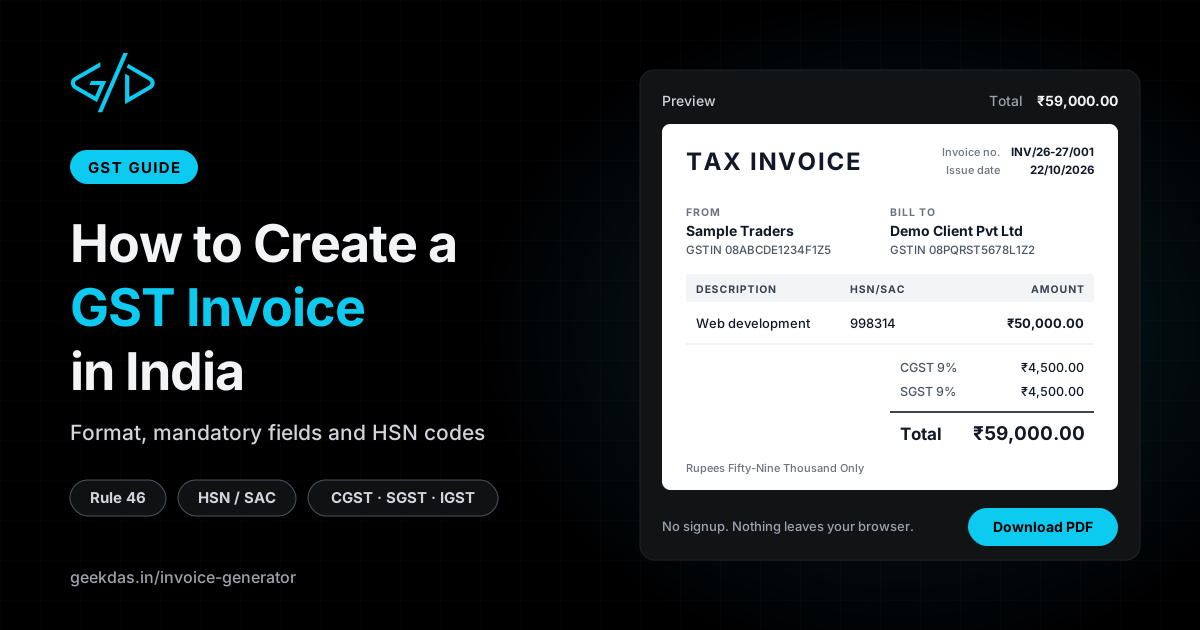
A Rajasthan freelancer bills a Rajasthan client ₹50,000 for web development (SAC 998314) at 18% GST. Select Rajasthan as both parties' state, and the generator applies CGST and SGST.
Item | Amount |
|---|---|
Taxable value | ₹50,000 |
CGST @ 9% | ₹4,500 |
SGST @ 9% | ₹4,500 |
Invoice total | ₹59,000 |
Example 2: Interstate Goods Invoice with Discount
A Delhi trader sells 10 laptops (HSN 8471) at ₹40,000 each to a Karnataka buyer with a 5% discount and 18% GST. Check the current rate for your own product. Choose Karnataka as the buyer's state, and the generator switches to IGST.
Item | Amount |
|---|---|
Gross value | ₹4,00,000 |
Discount @ 5% | ₹20,000 |
Taxable value | ₹3,80,000 |
IGST @ 18% | ₹68,400 |
Invoice total | ₹4,48,400 |
Because the sale crosses state lines, only IGST applies.
Common Mistakes to Avoid
Charging the Wrong Tax Type
Use CGST and SGST when the supplier's state and the place of supply match. Use IGST when they differ. Mixing them up blocks your buyer's ITC.
Missing or Wrong GSTIN
A typo in the buyer's GSTIN can make the invoice unmatchable in GSTR-2B. Verify it on the GST portal first.
Breaking the Number Sequence
Duplicate numbers, skipped numbers or numbers beyond 16 characters invite questions during an audit.
Applying Discount After Tax
Calculate tax on the discounted value, not the original price.
Ignoring E-Invoicing
Businesses whose aggregate turnover has crossed ₹5 crore must generate e-invoices with an IRN for B2B supplies. Manual PDFs alone will not do.
Benefits of a Correct GST Invoice
Smooth Input Tax Credit
Your buyer can claim ITC only when your invoice details match what you report.
Easy Return Filing
Accurate HSN codes, values and tax splits make GSTR-1 preparation and reconciliation far quicker.
Audit Readiness
Sequential, complete invoices give you a defensible paper trail. An incorrect or incomplete invoice can attract a penalty of at least ₹10,000 or the tax involved, whichever is higher.
GST Invoice vs Other Billing Documents
Document | Used when | Charges GST? | Buyer can claim ITC? |
|---|---|---|---|
Tax invoice | Regular registered supplier sells taxable goods or services | Yes | Yes |
Bill of supply | Composition dealer or exempt supply | No | No |
Invoice-cum-bill of supply | Mix of taxable and exempt items | On taxable items only | On taxable items |
E-invoice (with IRN) | B2B supplier above the e-invoicing threshold | Yes | Yes |
Proforma invoice | Quotation before the sale | No | No |
Credit note | Returns, discounts or price reductions after the invoice | Adjusts the tax | Adjusts ITC |
A proforma invoice is not a tax document. Never use it to claim ITC.
Conclusion
To create a GST invoice in India, include every Rule 46 detail: supplier and buyer GSTINs, a unique sequential number, the correct HSN or SAC code, the taxable value, and the right split of CGST, SGST or IGST. Add the place of supply, reverse charge status and a signature.
For small jobs, the free GeekDas Invoice Generator gets you a complete GST invoice PDF in minutes, with the tax split and amount in words handled for you. As volumes grow or e-invoicing applies, move to accounting software that connects to the GST system.
Was this article helpful?